×
[searchandfilter taxonomies="search"]

Managing Compliance Costs with Enhanced Cybersecurity Visibility

By Greg Wendt • May 14, 2020

Data privacy regulations are rapidly reshaping the way companies monitor, manage, and even define the data they collect and store. Prior to new privacy regulations put in place by the European Union and the state of California, the data lifecycle focused solely on collection and dissemination. This meant that the enterprise would collect as much information as possible then store it in a way that maximized accessibility, particularly with the rise of mobile. Cybersecurity, when it was discussed, focused on establishing defensive perimeters to mitigate external threats.

However, since GDPR was implemented in 2018 and reinforced by CCPA in 2019, companies have been required to reconsider how that information lives in their organization and identify who has access to it in order to meet basic compliance standards. Security teams that can adapt to the new requirements are critical to tackling the ballooning costs in compliance, particularly as other states and countries look to pass their own privacy regulations. 

The CCPA and GDPR have elevated customer data security to become a key priority across multiple departments. Since both laws are in the early stages of implementation and interpretation by enforcement agencies, legal departments have become an essential ally in compliance. In the case of the GDPR, the right to be forgotten has been contested by search giant Google in several high-profile court cases, adding greater nuance and detail to how the law impacts data management. Human resources is also a valuable partner in compliance management as they are best positioned to engage employees on new security protocols and assist in the successful deployment of new technology to ensure that workflow is not disrupted. 

Legacy infrastructure increases compliance costs 

The CCPA alone is expected to cost enterprises $55 billion in initial compliance costs, with additional costs to be expected in maintenance fees, with IBM’s 2019 Cost of a Data Breach Report states that the average total cost of a data breach increased to an average of $3.92 million in 2019, though in the United States the average cost per breach rose to $8.9 million. Much of that cost is driven by the recovery process, which involves understanding how the system was breached, what information was affected and bringing systems back online. For many organizations, understanding the scope of damage is difficult because current security systems aren’t designed for data visibility or access management, both of which enable security teams to track who has accessed what data and when. 

Data visibility is a particularly acute challenge in ERP systems because they contain highly sensitive business data, such as financial information, intellectual property or insurance details. Since ERP systems hold so much valuable data, they’re often the last piece of the digital infrastructure to be updated. This results in security gaps when patches are missed, or new security features are added to a legacy system. The “black box” of ERP systems can cause delays in damage assessments, resulting in the risk of hefty fines as the GDPR requires affected customers to be notified within 30 days of when information is compromised. 

Organizations lack tools to comply with “right to know” 

Compliance costs have largely been driven by the wave of “right to know” and “right to be forgotten” requests from their users. The right to know establishes the right of the consumer to know exactly what data a company has collected on them, and to download that data. For the enterprise, this requires being able to identify, organize and share all information pertaining to every single user, breaking the black box paradigm that existed before GDPR. Recent research shows that each request is estimated to cost approximately $1,400, quickly adding to compliance costs. 

The right to be forgotten allows consumers to request that any data related to them be deleted from an organizations’ database. Though the rule is less broadly applicable than the right to know, organizations should be careful of potential violations in their third-party partners or even of careless practices by employees. 

For GDPR and CCPA compliance, outdated and disparate infrastructure also adds major challenges, especially when adhering to the response time limits set out by GDPR. The law requires that organizations respond to right to know requests within 30 days. Yet a global survey of 103 companies worldwide across various industries found that 58% of respondents were unable to meet data access and portability requests within the one-month time limit. One of the main barriers to timely right to know requests was the lack of consolidated, transparent data structures that made finding all relevant information on each individual a costly and long process. 

When organizations don’t understand where collected data is or who can access it, compiling a right to know report is next to impossible. Without any means of tracking access within their internal databases, most enterprises have no idea if the personal information of any user has been accessed, copied or stored in multiple places, forcing compliance teams to track down each piece individually and risking fines when request response takes longer than 30 days. Not only does this heighten the likelihood of compliance violations, but also contributes to the rise of insider security threats, particularly in highly sensitive fields like healthcare and finance. 

As a result, security and compliance teams have begun joining forces to better understand the lifecycle of business data in the enterprise and how it can be effectively secured. 

Regulations align with industry trends 

In many ways, the new regulatory pressures brought by the CCPA and GDPR align with emerging trends in cybersecurity. Insider threats are one of the fastest growing trends in data breaches, accounting for 34% of attacks in 2019. Security features that enable granular tracking of user behavior in real-time addresses ensures access management can be done accurately while also adhering to privacy standards set forth by the GDPR and CCPA. As a result, organizations improve both security and compliance because they can be better prepared to respond to insider threats, minimize direct damage caused by a breach as well as void penalties incurred by compromising customer data. With greater means to identify and differentiate users, security teams are also able to increase access controls as well as better understand who has modified data and when. 

The GDPR and CCPA have had a significant impact on the public expectation for privacy and security. While security measures like multi-factor authentication (MFA) and complex passwords have existed for years, consumers and developers frequently opposed requiring them due to concerns over adding too much friction to the user experience. With cybersecurity concerns entering the mainstream, many consumers are actively seeking out additional ways to protect and manage their personal data. For the enterprise, this has increased employee’s receptiveness to new security features such as MFA to internal systems. Particularly with complex ERP systems, system administrators can unify the heightened expectations for security created by the GDPR and CCPA to reduce the costs of compliance. 

Advanced security tools can address challenges experienced across all departments by supporting secure migrations, enabling better data visibility in new systems, and reducing the long-term costs of compliance. As the security discussion evolves to when not if a hack takes place it is essential to have a holistic program in place to understand what actions will be taken when data is compromised. By hiding their head in the sand, the unprepared enterprise not only risks more damaging attacks but also larger fines. The right security tools can lay the foundation for a program that effectively fulfills the multidisciplinary role of security and engages all necessary experts to protect data and minimize compliance costs. 

This article was originally published by CPO Magazine. 

Put the Appsian Security Platform to the Test

Schedule Your Demonstration and see how the Appsian Security Platform can be tailored to your organization’s unique objectives

The Implications of Remote (Higher Education) Learning… Now that CSU Announced Campuses are 100% Remote in the Fall

By Scott Lavery • May 13, 2020

California State University, the largest four-year public university system in the country, made headlines when it announced Tuesday that it intends to continue with remote teaching in the fall term at all 23 CSU campuses, affecting most of its 482,000 students. This was a bold move, but I applaud the CSU system, or any college or university, as the rapid shift to online instruction amidst COVID-19 has been an undertaking of historic proportions. 

Lost in the headlines is the amount of work that IT teams must do to enable remote access for nearly the entire university staff and faculty. For Cal State University (an Appsian customer – 17 campuses), that’s more than 53,000 faculty and staff who need access to key information and systems. Along with student users, in total, that’s 535,000 (mostly remote) users accessing the university’s ERP systems from all over the world

The implications of this decision are wide-reaching. Beyond answering questions like, how will you be able to keep students engaged or how will you be able to provide parity to classroom learning, there are a myriad of implications placed squarely on the enterprise systems that support these institutions (ex. PeopleSoft and SAP ECC.) With millions of students, faculty and staff depending on these applications to keep operations running smoothly, how will campuses look to adapt these systems to their new normal? How can they ensure these systems can meet these new demands?

Universities Must Focus on (2) Key Areas: User Experience and Data Security 

Remote and distance learning means operations will be extremely dependent on self-service. Universities using PeopleSoft Campus Solutions face a double-whammy. Maintaining strict authentication and data security policies create challenges on their own. In addition, many campuses require additional UX/UI solutions that enable a unified mobile user experience. Without additional UX solutions in place, PeopleSoft’s mobile user experience can be challenging for students to navigate – especially as they’re trying to access self service via mobile devices. Several colleges and universities use the full suite of Appsian’s technology to address these issues.  

For Students, User Experience is EVERYTHING 

Today, student’s primary method for communication is through their mobile devices. A common problem for universities is that PeopleSoft Campus Solutions’ primary interface is PeopleSoft Classic. This UI is not mobile responsive and has a look and feel that doesn’t necessarily align with Millennial and Gen Z. expectations. As tens of thousands of students register for classes in the fall, this user experience could prove to be problematic, as students are so used to intuitive experiences. Without UX/UI enhancements, campuses run the risk of flooding their support desks or having students abandon self-service transactions – not meeting key enrollment deadlines. 

PeopleUX by Appsian turns the Classic interface of PeopleSoft Campus Solution into a visually engaging user experience. Students can easily navigate through transactions like add/drop/swap courses, view grades, class schedules, search for classes, access advisor information, and financial aid details from their mobile device. Giving students the proper tools to execute the majority of their tasks through self-service will alleviate your staff’s workload. It will also provide one less hurdle students (especially new students) will have to get over before class begins in the Fall. 

For EVERYONE, Data Security is EVERYTHING 

Colleges and universities face the same challenges as businesses that had to transition entire workforces from office-based to work-from-home. Remote access is now a requirement, and IT departments should have the ability to dynamically control access to sensitive transactions and maintain granular visibility into user behavior – something ERP systems like PeopleSoft and SAP ECC inherently lack.  

Campuses are turning to VPN to ensure secure authentication, but VPNs have plenty of vulnerabilities. In many cases, adding Multi-Factor Authentication via Duo Security® has been a top choice – one that Appsian couldn’t recommend more. However, integrating an MFA like Duo with PeopleSoft or SAP ECC presents significant challenges. Integration is necessary, especially if you’re looking to apply step-up MFA at the transaction level. This is recommended because application-layer authentication is good, but transaction level authentication is ultimately the best way to ensure data isn’t unnecessarily exposed.  

Integration also allows you to leverage adaptive MFA. This can enable you to deploy MFA challenges (at the application layer) based on the context of access, such as business hours, location of the device accessing the system, and type of device. This flexibility can reduce the disruption of MFA challenges on the user and ultimately provides significantly better data security. 

Additionally, campuses must consider how they can maintain visibility over the data in their transactions. After all, when you consider the sheer volume of sensitive data in a student information system like student records, student financial information, parent financial information, etc. it becomes clear that the implications of a breach could be catastrophic. This is not lost on hackers who are now aware that large university systems are moving to 100% remote learning. These are data security implications that are not simple to solve, but the focus must be on visibility, control, oversight, and accountability. How detailed is your view of data access and usage? If there was a potential security threat, how long would it take you to detect and remediate it?

Conclusion 

It’s too early to tell how many colleges and universities will follow Cal State University’s lead and announce remote learning plans for the Fall semester. Regardless, now is the time to prepare for a school year that still has many variables and unknown factors that can influence a decision. 

Request a demonstration so you can get to know the many ways that Appsian can help your university and college tighten your PeopleSoft data security and deliver a mobile-responsive and visually compelling user experience to students. 

Put the Appsian Security Platform to the Test

Schedule Your Demonstration and see how the Appsian Security Platform can be tailored to your organization’s unique objectives

ERP User Activity Monitoring: Here are the (5) Most Important Details to Capture

By Michael Cunningham • May 12, 2020

Analytics have always been necessary for informing ERP data security policies. This has never been more relevant than today, in this everybody-works-from-home environment where function leaders are scrambling to attain oversight and accountability. With whole departments spending 8 hours a day in business applications like PeopleSoft and SAP, establishing strong ERP user activity monitoring strategies is mission-critical. We also touched on this topic a few weeks ago, but now that organizations are adopting visibility solutions, the question becomes – what are the most important details to capture?

Always Capture the Who, Where, When, What, and How 

Remember the good old days of February 2020 when articles touted the growing trend of working from home and that remote access to your ERP system and making transactions available on the internet will one day become the “new normal?” Ah, good times.  

Then COVID-19 happened, and remote work went from growing trend to hard-core reality in a matter of days. System administrators scrambled to collaborate with managers to create new or updated work-from-home polices that determine who, what, where, when, and how workers can access ERP data – and what transactions they’re allowed to perform. Good times, indeed. 

Let’s break down these different details… 

1. Who – Details of the User Accessing the Data 

Even if your user authentication strategies are strong (ex. leveraging multi-factor authentication), you’re still going to have security concerns – especially with high privileged user accounts. Narrowing your visibility efforts on high privilege user activity allows you to focus on the accounts that can cause the most damage (if corrupted or misused.) For example, your organization may be global (with ERP access coming from multiple countries) but your high privilege users may primarily reside near your domestic HQ. High privilege access coming from outside this IP range may be an early sign of unauthorized activity.

2. What – Details of the Data Being Accessed 

What are those Tier 1, highly sensitive data fields you want to closely watch? I’m talking about C-suite salary information, social security numbers, bank account information, etc. Application level logging falls short in showing exactly what a user accessed. However, these details are ultimately the most important. If you do not have visibility into exactly what a user accessed, then you are missing a significant part of the data security puzzle. In many instances, field level logging can show you how much “over access” users may have. After all, least privilege is a best practice – especially in remote environments.

3. Where – Location Where the User is Accessing the Data 

As mentioned above, location can be a leading indicator of unauthorized activity. This strategy can be expanded, especially if you’re operating in a vertical that typically doesn’t require global access (ex. higher education, healthcare, state & local government, etc.) Whether it is a sudden influx of authentication requests from China or one-off access from a European country, having location data is an essential component of ERP user activity monitoring.

4. When –Time of Day When User is Accessing Data 

Thanks to stay-at-home orders, normal 8 to 5 work hours don’t apply when users must (potentially) deal with kids or other distractions. Simply enacting policies that restrict certain transactions from being executed outside of business hours is a quick way organizations can enhance oversight – but how can you really enforce it at scale? Either way, monitoring after hours activity, while not an obvious indicator of a problem, is a solid baseline. Especially if most ERP processing activities are being executed by hourly employees.

5. How – Type of Device Accessing Data 

One of the difficult aspects of rapidly deploying remote ERP access is getting an inventory of all the devices they’ll use. Corporate-managed vs personal devices have a large impact on how you want sensitive business data accessed. Even if every employee has a company-issued device, you’re bound to see unauthorized devices (mobile phone, tablet, personal workstation or laptop, etc.) accessing your system. Knowing exactly what these devices are accessing (or possibly downloading) is extremely important for data loss prevention.

Real-Time User Activity Monitoring Leads to More Informed ERP Data Security Decisions 

Using the Appsian Analytics Console, you get a 360-degree view of what is happening around your ERP data. From there, you can map out a targeted incident response before damages become catastrophic and influence your ERP data security policies.

Some additional examples of ERP data security measures you can deploy include: 

  1. Enabling adaptive authentication policies that deploy additional authentication challenges based on the context of access 
  2. Restricting the availability of specific transactions (partial or full) when access is coming from unwanted geographic locations 
  3. Masking any data field (partial or full) 

Appsian enables organizations to enhance their level of control and visibility over business data. To ease the anxiety of allowing remote ERP access, Appsian can help you make the rapid changes (avg. go-live in 2 weeks) necessary to manage and mitigate risk.

Request a demonstration of the Appsian Analytics Console today.  

Put the Appsian Security Platform to the Test

Schedule Your Demonstration and see how the Appsian Security Platform can be tailored to your organization’s unique objectives

Happy World Password Day! Celebrate By Adopting Passwordless Authentication (for PeopleSoft)

By Scott Lavery • May 7, 2020

Every first Thursday in May, cybersecurity professionals collectively roll their eyes at the idea that there is (in fact), a World Password Day. Why? Because PeopleSoft passwords are the undisputed King of Liability of most enterprise organizations.

User credentials are stolen at an alarming rate – and the tactics are becoming more sophisticated. Throw in the fact that users are now working from their living rooms, home offices, and in many cases… mobile phones – hackers see their opportunity and they’re taking it.

This is precisely why Gartner predicts that by 2022, 60 percent of large and global enterprises, and 90 percent of mid-size enterprises will implement passwordless authentication methods.

Why Organizations are Adopting Passwordless

Risk of Weak/Stolen Passwords

Like I mentioned, phishing and spear phishing attacks are on the rise. Hackers are able to crack user credentials easily as evidenced by the 2017 Verizon Data Breach Report that stated 81% of hacking related breaches used either weak or stolen passwords. This would be a clear sign that an organization should limit their use of passwords wherever possible.

Passwords Can be Expensive to Maintain

Managing passwords can be an expensive affair. According to Forrester Research, the average helpdesk labor cost for a single password reset is $70. The more complex your identity and access management is, the more expensive it will be.

Passwords Hinder Productivity

Imagine an employee taking ten minutes out of their schedule to recover a forgotten password. Now imagine hundreds of users facing the same issue. Doing away with passwords can help organizations save time and increase productivity.

Why PeopleSoft Passwords are a Challenge

PeopleSoft throws an extra wrench into the authentication/password equation; given PeopleSoft passwords tend to be very weak and users require different credentials for each application. Some organizations use a portal to simulate a single sign-on but the challenge of weak passwords still remains for portal authentication.

Organizations are fully aware of the challenges with PeopleSoft passwords and tend to customize solutions that are complex, frequently break, and generally add more complexity than they’re worth – this is topic is heavily treaded.

The Fastest Path toward Adopting Passwordless for PeopleSoft

Establish an SSO through your existing SAML Identity Provider (IdP)

Your IdP is your central means of authenticating users – so use it for critical business applications like PeopleSoft. This is especially important for enabling remote access for high privilege users, because your IdP is the most reliable way to authenticate. Having to provision identity outside of your IdP just adds complexity. Establishing a SAML Single Sign-On for PeopleSoft is the best way to enable secure, seamless access without adding the complexity of a customized solution.

Implement Adaptive Multi-Factor Authentication (MFA) at App & Transaction levels

Adopting a multi-factor authentication (MFA) can be one of the fastest ways to a passwordless system. An MFA secures authentication with two or more factors: Something that a user is (biometrics), Something that the user knows (password), Something that a user has (an OTP, or a security token.)

Adaptive MFA enables additional authentication steps that align with the level of risk posed by the user. If combined with an SSO, an MFA can challenge a user if you feel their session could have an element of risk (unfamiliar location, device, outside of business hours, etc.) Using a combination of factors not only eliminates PeopleSoft passwords – it drastically decreases the likelihood of a successful data breach. And, as a bonus, provides a better user experience.

Appsian Supports Passwordless with Data-Centric Security

Appsian enables your security posture to be data-centric, not user-centric. Users have passwords and users lose passwords. Appsian enables your security policies to be aligned with the data a user is attempting to access. Thus, you are not relaying on a password to prevent unauthorized access – you’re able to rely on the true identity of the user.

Data-centric security in conjunction with solutions (SSO & MFA) that enable you to use your central authentication mechanisms (AzureAD, ADFS, OKTA, etc.) eliminate the need and liability of users having PeopleSoft passwords. Resulting in better security, productivity, and user experience.

Conclusion

As you “celebrate” World Password Day, we should all be reminded that the landscape has changed forever. Remote access, blended access, etc will be the new way of life and relying on passwords is no longer the most reliable way to maintain security.

The stakes are too high and while there may feel like a never-ending list of priorities, adopting a passwordless security model should be at the top of the list.

Contact us to learn how we can enable your rapid adoption of a passwordless PeopleSoft authentication strategy.

Put the Appsian Security Platform to the Test

Schedule Your Demonstration and see how the Appsian Security Platform can be tailored to your organization’s unique objectives

Oracle Extends PeopleSoft Support to 2031. Now’s the Time to Invest in PeopleSoft Data Security Projects

By Michael Cunningham • May 6, 2020

On April 19, 2020, Oracle announced on its PeopleSoft Support blog that the company is extending support for the ERP application through 2031. As stated on the blog, Oracle remains “committed to a rolling ten years of support for PeopleSoft. We will review and plan to extend support again next year, and the year after that, so that you have a decade of committed support and can plan your enterprise software investments accordingly.”  

This news should give PeopleSoft customers a sense of certainty that investing in the long-term success of their PeopleSoft applications is mission-critical. Thanks to COVID-19, organizations may be concerned about their short-term financial stability. Add in the newfound uncertainly of continuing large-scale IT projects in this climate (like a cloud ERP migration) – organizations have now found themselves looking for ways to reap maximum benefits with the lowest degree of overhead and project completion time.

Three “Home Improvement” PeopleSoft Data Security Projects  

With large-scale projects on hold, it’s a good time to invest in smaller-scale projects that focus on what is truly mission-critical today (and for the near future) – PeopleSoft data security. You’re already working hard to secure data while users are accessing remotely and while bandaids may be in place right now, organizations must consider strategies that scale long-term. 

Here are three smaller “home improvement” projects that strengthen your PeopleSoft data security posture: 

Integrate your SAML Identity Provider (IdP) for Single Sign-On (SSO)  

When you count the hours spent managing passwords (80% of help desk calls) or tackling SSO projects using customizations and home-grown solutions, you find that removing the complexity of PeopleSoft password management is an ROI positive project. Add in the lost productivity of users not being able to access business transactions (because they’re waiting for their password to be reset), then the ROI increases. The bottom line, a SAML-configured Single Sign-On for PeopleSoft will make everybody happy. A SAML SSO provides the combination of security and productivity that organizations are striving for. And, given the alarming uptick in phishing attacks – user credentials have become an obvious liability.

Strengthen IAM with Adaptive Multi-Factor Authentication (MFA)

When you’re buying new appliances for a remodeling project, you buy a washer and dryer in pairs. Yes, you can wash and dry your clothes using one or the other, but using both is a better option. Same with applying an adaptive multi-factor authentication (MFA) with your SSO as an effective method for verifying identity. Adaptive MFA ensures that contextual attributes (ex. device, network, location) are the determining factor for deploying MFA challenges. The context of access varies in mobile and work-from-home environments, and your level of control should do the same.  This is essential if your users are accessing remotely, as managing authentication (especially for high privilege users) can be challenging.

It is also recommended to expand the use of MFA and apply step-up challenges on transactions that may be considered ‘highly sensitive.’

Real-Time Visibility for User Activity Monitoring and Transaction Logging  

Just like a rug can tie a room together, real-time visibility via user activity monitoring and transaction logging can be the perfect complement to your PeopleSoft data security fixer upper. There are a lot of sensitive transactions being executed outside of the office these days, and monitoring user activity gives you a better sense of how your data is being accessed and used.  

Invest in Today and Plan for Tomorrow 

Now is a good time to take Oracle’s lead in their extension of PeopleSoft support – and alleviate a lot of the complexity around PeopleSoft data security, identity, and access management. Securing remote access with SSO and adaptive MFA today provides significant PeopleSoft ROI – along with applying a strong data security framework that can scale with a myriad of workforce and landscape changes.

Best yet, you can complete these projects in only two to four weeks, and we guarantee you won’t be cleaning up any sawdust when you’re done. 

Request a demonstration of the Appsian Security Platform today.

Put the Appsian Security Platform to the Test

Schedule Your Demonstration and see how the Appsian Security Platform can be tailored to your organization’s unique objectives

How to Streamline the SAP Segregation of Duties Exception Process Using Attribute-Based Access Controls

By Ryan Quinonez • April 29, 2020

Secure, compliant, and efficient business processes are critical to enterprise operations. In SAP, Segregation of Duties (SoD) is a key principle in making this possible.

What happens when an SoD exception is necessary?

Often times a user will need to be granted roles and privileges that pose a conflict of interest. It could be that an employee is part of a small department, or that a security clearance precludes others from involvement.  Whatever the reason, this user needs the ability to handle multiple steps in a business process – and an exception is made.

Here’s where things can get tricky. Once an SoD exception is made, your standard preventive controls are no longer effective. This is one of the major shortfalls of SAP’s static, role-based access controls.

Shifting from a preventive approach to a detective approach…

… you must now gather access logs, filter out false-positives, and finally, send to the appropriate control owner to review and sign-off. Besides the additional overhead of manual reviews and approvals, detective controls create room for human error and increase the dwell time before red flags are caught.

So why are current SAP SoD Controls limited?

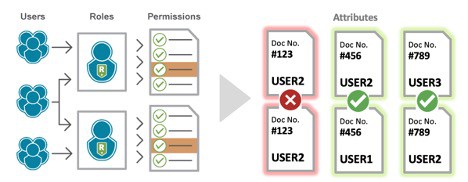
Without the logic ability to decipher potential violations from actual violations, preventive controls are a non-starter. Your (preventive) SAP access controls determine authorizations based on two things: 1.) a user’s role and 2.) the role’s associated permissions (think transactions.) While this works in the vast majority of cases, enforcing SoD requires controls with more granularity.

Let’s take a look at what an actual SoD violation entails

The whole objective of SoD is to avoid conflicts of interest in your business processes. Although, conflicting transactions do not necessarily pose a conflict of interest, unless the subject is the same.

For example, a user performs the transactions to create and approve multiple purchase orders. Looking at the transactions themselves, this activity has the potential for violations. Looking deeper into the PO details, you may see that the user never created and approved the same PO – therefore no violation was made.

SAP can show you 1.) the user and role, and 2.) the transactions performed, but is missing the 3rd component: the field-level values in the PO itself. This lack of visibility into attributes beyond roles and permissions is what makes preventive controls a non-starter and clutters SoD audit logs with false-positives when exceptions have been made.

The Solution? Enforcing SoD Policy with Attribute-Based Access Controls

Attribute-Based Access Controls (ABAC) enable the use of “attributes” in authorization decisions. These attributes can be anything from user details such as role, department, nationality, or even a user’s security clearance level. Additionally, access context such as IP address, location, time, device and transaction history can be considered. And most importantly for SoD, data attributes can now be used in authorization logic. This means that field-level values within SAP can be used to determine whether to block or allow a transaction, and these details can further be used in reporting activities.

In the Purchase Order example above, data attributes can be used to identify whether a user performed the first transaction and make the correlation that performing the second transaction would result in a violation. 

Combining SAP’s role-based access controls (RBAC) with an attribute-based access control (ABAC) solution enables granular control and visibility that delivers a wide range of business benefits.

Newfound Flexibility in SoD Exception ScenariosRBAC + ABAC Hybrid Approach

The RBAC + ABAC hybrid approach opens the possibility to apply preventive controls in SoD exception scenarios. By doing so, you can offer users the flexibility an exception provides while still preventing any actual violations from happening.

Together, this hybrid approach (RBAC + ABAC) enables a dynamic SoD model that prevents violations while still allowing the flexibility of conflicting roles to be assigned (when necessary) and reinforces role-based policy to mitigate over-provisioning.

RBAC + ABAC Hybrid Approach Using Appsian

Appsian adds an additional authorization layer to SAP GRC Access Control that correlates user, data and transaction attributes, along with identified SoD conflicts, to block conflicting transactions at runtime.

Contact Us to learn more about how a hybrid access control approach can strengthen Segregation of Duties (SoD) at your organization.

Put the Appsian Security Platform to the Test

Schedule Your Demonstration and see how the Appsian Security Platform can be tailored to your organization’s unique objectives

Why VPN is Not Enough – and why Investing in ERP Data Security is Critical

By Scott Lavery • April 22, 2020

With remote workplaces being put to the test, organizations are looking to quickly scale their security practices. Unfortunately, many are learning the hard way. They find themselves at the intersection of using conventional security technology like a virtual private network (VPN) to secure data residing in traditional, on-premise ERP applications like PeopleSoft and SAP ECC. This can be a toxic combination that may leave you feeling secure, but it should be noted that your data remains at risk.

A VPN is Not Data Security

Plain and simple – a VPN is a connection point. While it may shrink your threat surface, there are still many risk factors to consider. For instance: where is a user coming from? What data are they trying to access? What device are they using? Is that device actually being used by the right person? What PeopleSoft data are they trying to extract onto their personal device? And so on, and so one…

Once a VPN authenticates a user, a myriad of risk factors remain. This is where a VPN ends and data security should begin. However, most organizations are simply not prepared to mitigate the risks that come once a user has passed a VPN. Here are a few examples:

Federating High Privilege Users

High privilege users should face the most scrutiny. Ideally, a high privilege user should authenticate through Active Directory or whatever identity provider an organization is using. They should then receive federated privileges to PeopleSoft based on the contextual attributes of their access (ex. are they accessing from a foreign country?) Federating high privilege access is a fundamental way to ensure a user is provided with the appropriate level of privilege. However, a VPN cannot do this. In fact, authenticating to PeopleSoft using a SAML identity provider (like Active Directory) can be challenging unto itself (see this blog for more info.)

If the point of a VPN is securing remote access, then why not consider the contextual attributes that come with said access? After all, the remoteness is what is considered the risk. In this scenario, a VPN is merely acting as a thin authentication layer, on top of PeopleSoft’s typical username and password model. What if a user opts to make their VPN password the same as their PeopleSoft password? This is what hackers anticipate and sadly, they are usually correct.

Malicious Insiders Tend to be High Privilege Users

This is a touchy subject but should be acknowledged. While no one wants to assume the worst in their employees, the fact remains that the more access you have, the more damage you can do. Given the right motivation – bad things can happen. This is the most compelling case for data security because the highest stakes surround high privilege users. A/P, A/R, Finance, Supply Chain, Payroll – all these functions deal with money. Having the ability to lock down and limit access to data and transactions will have a tremendous impact on an organization’s ability to mitigate financial losses from fraud, theft, and espionage. And because of COVID-19, all of these functions are now being executed remotely. The potential for damage is exponentially greater than before.

Ask yourself – should payroll queries be run and exported onto a personal device? Should wires be sent outside of normal business hours? Should a vendor be created when access is coming from a foreign country? I believe the answer you’re looking for is… NOOOOOOO!!!

Integrating dynamic, risk aware controls on sensitive financial transactions (and data fields) mitigates much of this risk. In addition, transaction logging and analytics prove to be extremely beneficial, as many organizations would prefer not to hamstring their employees with restrictions. However, they would prefer to gain better visibility in case an anomaly is detected.

A VPN Can Be Costly, Unscalable, and Leave You in The Lurch

Like any addition to your architecture, downtime can occur. VPN vendors can experience enterprise-wide outages – causing major disruption. In addition, with organizations moving toward a 100% remote access, VPNs can be prone to kicking people off after a period of time. Adjusting to remote work environments is frustrating enough, but if access is limited or hindered, and you don’t have the benefit of a readily available help desk – your users will become agitated. With so many senior leaders focused on business continuity, having additional hoops for your employees to jump through is counter to productivity.

And then there is the cost factor – which will certainly balloon with the increased number of users. We understand that costs will vary, but the ROI of 100% of your employees requiring a VPN to log into PeopleSoft is not positive. And as we established above, if the point of a VPN is increasing data security/maintaining integrity of financial transactions – then the ROI is even further from positive.

How Appsian Provides ERP Data Security for PeopleSoft and SAP Applications

Appsian believes user authentication is important, but it’s only one part of an ERP data security posture. This is why we developed the Appsian Security Platform for PeopleSoft. Enhancing an organizations ability to authenticate users is most effective when its: integrated with your existing identity management strategy and risk aware. This is where Appsian provides far greater value than a VPN. We enable seamless, secure access to PeopleSoft (specifically) via Single Sign-On (integrated with a SAML IdP), along with adaptive Multi-Factor Authentication. These solutions combine to provide a much better user experience and a vastly superior value if protecting PeopleSoft from bad actors is the primary intention of your VPN.

Lastly, visibility is key. With sensitive transactions being executed outside of the office having a better sense of how your data is being accessed and used is critically important. Using transaction logging and real-time analytics, Appsian provides PeopleSoft customers with unparalleled levels of visibility. Thus, allowing you to keep a watchful eye on your data at all times.

Summary

When approaching how you can enable secure, remote access – its best to identify what are the key objectives and invest in the technology that best suits those needs. Are you concerned that the data inside your ERP applications could be breached or exfiltrated? Are you concerned that financial transactions could be corrupted? If the answer is yes, then data security – and not solely a VPN are the answer.

At the end of the day, COVID-19 has forced organizations into unprecedented challenges. With an unstable market and unpredictable year(s) ahead, it’s important to focus security efforts on internal data and processes – as these being corrupted will result in losses that can make recovery significantly harder.

To learn more about how the Appisan Security Platform can protect your ERP data, please Schedule Your Demonstration

Put the Appsian Security Platform to the Test

Schedule Your Demonstration and see how the Appsian Security Platform can be tailored to your organization’s unique objectives

User Behavior Analytics are Critical in Remote ERP Environments. Here’s Why…

By Scott Lavery • April 17, 2020

I was recently speaking with a customer who expressed a common concern. Because of COVID-19, their entire finance team was forced to work remotely and they were concerned about the risks of executing critical financial transactions. Purchasing, payroll, expenses, everything… all being done from unknown locations and on devices they couldn’t regulate.

From Convenient to Mandatory

It got me thinking, prior to COVID-19 the objectives for enabling remote access to PeopleSoft had mostly been out of a desire for productivity and convenience. For years, Appsian has been working with forward-thinking organizations who identified remote access had significant value. Post COVID-19, organizations are in ‘survival mode’ and have no choice but to open access to their most sensitive financial transactions – and hope for the best. The potential for ‘adding insult to injury’ (ie financial losses) in a remote environment is enormous, and like any rapid pivot, requires a strong strategy to be successful.

You Don’t Know What You Don’t Know

During our conversation, it became clear that their situation posed far more questions than answers. For instance, ‘confidentiality around salary has never been more important’ (I assume they’ve required some employees to take salary reductions) ‘how can I know who viewed salary information, or perhaps downloaded queries?’ ‘how can I be sure unauthorized vendors are not being created?’ ‘how can I be sure payroll is being issued correctly?‘how can I be sure sensitive information isn’t downloaded to someone’s home computer?’ It became clear they were flying blind – and starting to panic.

Traditional ERP Visibility Come Up Short

None of the questions above were able to be answered in this customer’s current environment. It’s common knowledge that traditional ERP logging and analytics focus on troubleshooting errors and scanning for broad system vulnerabilities. They were not designed for understanding user behavior, data access, and usage. If the task is to ensure that data is not being accessed maliciously, exfiltrated, or business processes are not being exploited – ERP visibility comes up short.

This customer initially partnered with Appsian for Single Sign-On and Multi-Factor Authentication – both of which, they were happy to have! However, their attention had turned from intrusion prevention to incident response and risk management. While they had the capability to ensure user authentication was strong, they lacked the ability to understand what activity was taking place. And more importantly, if trends in user behavior were indicative of malicious activity.

How ERP Analytics Prevent ‘Adding Insult to Injury’

This is where ERP Analytics becomes essential. When ERP access is both remote and ubiquitous, the ability to detect and respond to malicious activity is greatly reduced.

Using the Appsian Analytics platform, customers are fully enabled to understand exactly how their ERP data is being accessed – by whom, from where, on what and why. With this information in hand, organizations are fully enabled to detect unauthorized activity and formulate a rapid response before damages become catastrophic.

Analytics Provide Peace-of-Mind

Needless to say, it feels good to provide true value to a customer. It’s not everyday that a customer comes to you, concerned that their business is in trouble (from a market perspective) and they are also concerned additional financial losses will follow (from a business process perspective.) This is where having available data and granular oversight will provide peace-of-mind. During unpredictable times, having as much information at your disposal is critical. This is especially true when sensitive financial processes are taking place outside of your office – essentially your direct control and watchful eye.

The Next Step…

If a lack of visibility is a concern, we’d love to talk. In a brief 30 minute session, we can outline how deep our Analytics can go, common use cases that are pre-configured in the platform, and how they can align to your unique business processes.

Request a Demonstration Today

Put the Appsian Security Platform to the Test

Schedule Your Demonstration and see how the Appsian Security Platform can be tailored to your organization’s unique objectives

Looking for a PeopleSoft ‘Quick Win’? Integrate SAML for Single Sign-On (SSO)

By Scott Lavery • April 7, 2020

It’s no secret that managing PeopleSoft passwords can be challenging. This has been a hot topic for years – and with COVID-19, we’re seeing a resurgence from increased remote access. A remote workforce can quickly put a strain on IT help desk services – especially with resetting passwords. Btw, hackers know that passwords are being reset at a record pace, as demonstrated by the massive uptick in phishing attempts (+667% since Feb. according to Forbes.)

With a myriad of IT projects and an ever-changing list of demands from the organization, setting priorities can be difficult. We’d suggest PeopleSoft customers prioritize a single sign-on for (4) key reasons:

PeopleSoft Passwords are a Security Liability

I eluded to this above, but the statistics speak for themselves. According the 2019 Verizon Data Breach Investigation Report, ‘91% of hacking attacks begin with phishing/spear phishing attacks.’ Organizations try to mitigate this by using a VPN. However, after the expense and potential disruption in service after a large percentage of your workforce is accessing critical business transactions using a VPN – there is little ROI in this strategy.

Might I suggest, requiring VPN access for ‘high privilege’ access only? Normal users that are accessing self-service can be secured by leveraging a Single Sign-On (and possible multi-factor authentication.)

IT Resources Need to be More ‘Focused’ Than Ever

We don’t need to belabor this point but suffice to say that changing your business operations overnight (in the case of COVID-19) causes complexity. Ensuring network/server availability and using help desk services to troubleshoot strategic issues is better than one-off password resets.

The ROI of an SSO Project (over time) is Very High

When you count up the hours spent managing passwords (80% of help desk calls), you quickly find that removing the complexity of PeopleSoft password management, is an ROI positive project. Add in the lost productivity of users not being able to access business transactions (because they’re waiting for their password to be reset), then the ROI increases. Bottom line, an SSO project will delight both users, IT teams, and your CFO alike!

This Project Can be Done Quickly (2-4 weeks.)

We’ve come to the (sort of) tricky part. Organizations have tackled SSO projects using customizations and home-grown solutions – all of which modify PeopleSoft code and create challenges down the line. Needless to say, if you’re looking for rapid deployment, with minimum complexity (today and in the future) – than a configurable approach is recommended.

This is where Appsian comes in, as we’ve developed the native SAML connector that can seamlessly integrate your Identity Provider (OKTA, ADFS, Azure, Shibb, etc.) with PeopleSoft – creating a configurable Single Sign-On. Thus, not effecting underlying PeopleCode or having an impact on future application upgrades.

Bottom line, if you’re looking to quickly alleviate a lot of the complexity around PeopleSoft identity and access management – Appsian can help! We have worked with hundreds of PeopleSoft customers around the world, helping them remove costly customizations and implement a SAML-configured Single Sign-On for PeopleSoft.

Let us show you! We can get you up in running in a couple of weeks!

Put the Appsian Security Platform to the Test

Schedule Your Demonstration and see how the Appsian Security Platform can be tailored to your organization’s unique objectives

Request a Demo

Start your free demo

"Learn how you can reduce risk with rapid threat protection, audit response and access control. All from a single, comprehensive platform"

Trusted by hundreds of leading brands